

Auto-replies monitor your incoming reviews and respond automatically based on conditions you set. They work across all connected platforms and languages.
In the dashboard, this feature lives under Reviews > Auto-replies in the sidebar; the page itself is titled Automations.
Automation rules
Each auto-reply is a rule made of two parts: trigger conditions that decide which reviews qualify, and a response method that decides what gets sent back.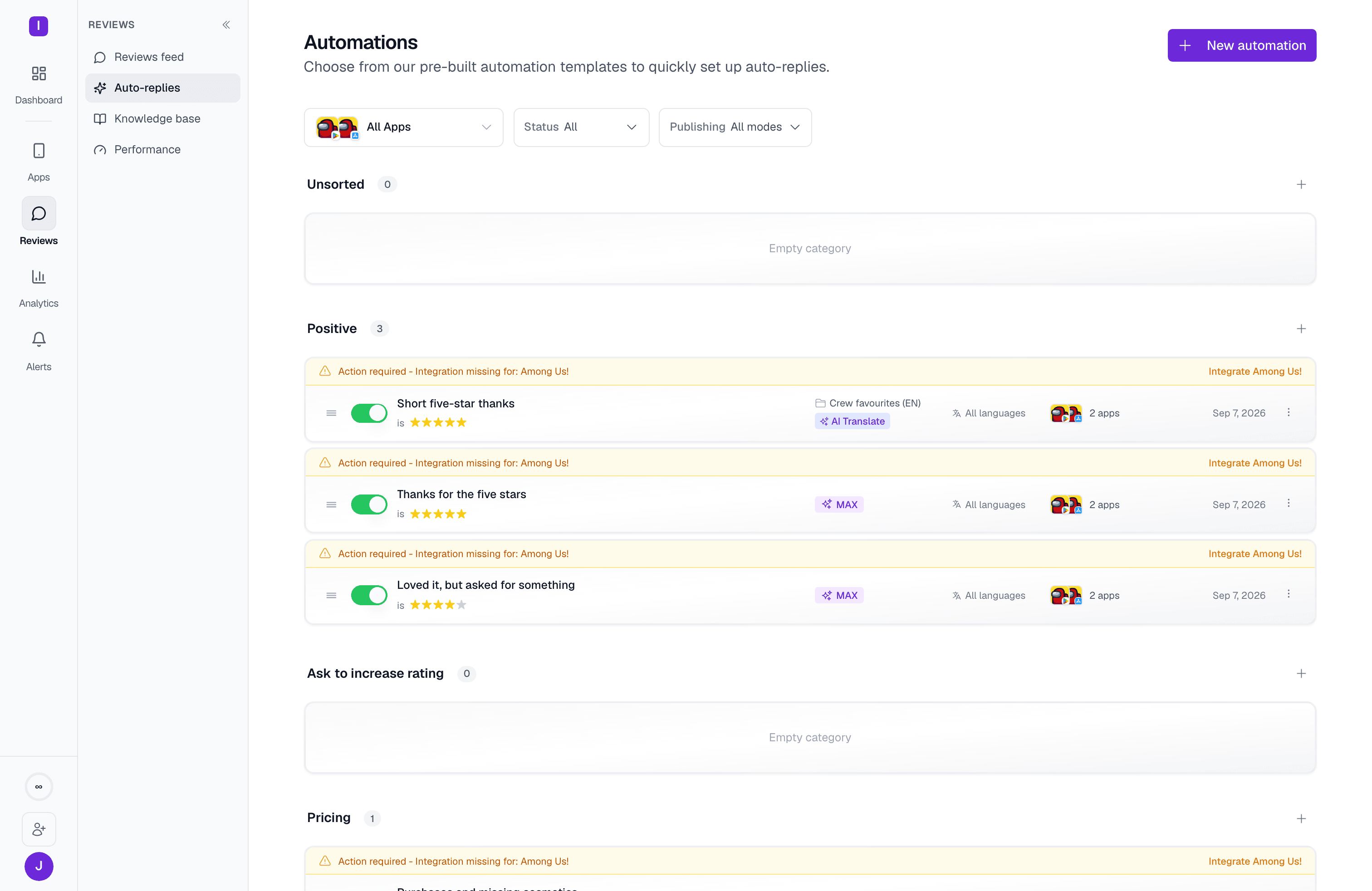
Key benefits
24/7 response coverage
Respond to reviews as they arrive, across every time zone, without anyone online.
Consistent brand voice
Keep responses professional and empathetic even during high review volumes.
Multi-language support
AI Translation automatically responds in 94+ languages.
Personalization
AI adapts each response to the specific review content and context.
Organization by categories
Your automation rules live in five categories that mirror real support workflows:Unsorted
Unsorted
Freshly created rules land here until you assign them to a specific category. Think of it as your automation inbox.Best for: Testing new rules before categorizing them properly.
Positive
Positive
Auto-respond to 4-5 star reviews with gratitude, feature announcements, or gentle requests for app store ratings.Best for: Thank you messages, feature updates, cross-promotion to other apps.
Ask to increase rating
Ask to increase rating
Auto-respond to users who like your app but gave 3 stars over minor issues you’ve since fixed.Best for: Rating update requests, showcasing recent improvements, feature highlights.
Pricing
Pricing
Address billing questions, subscription confusion, and pricing concerns with clear, helpful responses.Best for: Subscription explanations, billing support, feature value communication.
Negative
Negative
Handle 1-2 star reviews with empathy, quick triage, and paths to resolution.Best for: Bug reports, feature requests, user experience issues, damage control.
Filtering and browsing your rules
Above the category list, three controls narrow what you see:- App scope — all apps, or one specific app
- Status — All, Enabled, or Disabled
- Publishing — All modes, Auto-post, or Approval
How auto-replies work
1
Monitor reviews
AppReply continuously monitors your connected app stores for new reviews.
2
Evaluate conditions
Each review is checked against your automation rules’ trigger conditions (rating, keywords, language, length, featured status).
3
Generate response
When a match is found, AppReply generates a response using either:
- Template-based responses (with optional AI enhancement)
- AI-generated responses (crafted from scratch based on your instructions)
4
Post or queue
Depending on the rule’s publishing mode, the response is either posted to the app store immediately, or saved as “Pending approval” for a teammate to review first.
Response methods
Choose from two response approaches:Template-based responses
Use your pre-written response templates with an optional AI enhancement:- Standard reply: Use the template exactly as written
- AI rewriting: Let AI rephrase your templates for variety while preserving meaning
- AI translation: Automatically translate the template to match the reviewer’s language
AI-generated responses
Let AI craft completely custom replies from scratch, guided by your instructions and (on the Pro plan) your knowledge base and past replies.Getting started
Quick start
- Create your first automation rule
- Set trigger conditions (rating, keywords, etc.)
- Choose your response method
- Test and enable
Multi-app automations
A single automation can apply to multiple apps at once, even across different platforms. When you create or edit a rule, select one or more apps under Applications. You do not need to create separate rules for each app.Approval mode
Toggle Approval Mode on any automation to have responses saved as “Pending approval” instead of posting immediately, so your team can review and approve each response before it goes live. Toggle it off for Auto-posting Mode, where replies publish immediately without pre-moderation.New automations default to Approval Mode. You switch a rule to auto-posting deliberately, once you trust it.
Drag-and-drop ordering
Reorder automations within categories by dragging them. The order determines priority: when multiple rules match the same review, the first matching rule in the list takes precedence.Automation presets
Start from pre-built presets instead of creating rules from scratch — quick-start cards like “All New Reviews,” “Positive Reviews,” and “Ask to Increase Rating” appear right at the top of the rule builder, along with more options under More. Picking one pre-fills the rating condition, additional filters, and (for AI-generated presets) starting instructions, which you can still edit before saving.Duplicating a rule
Duplicate an existing automation to reuse its conditions and response setup as a starting point for a new one. The copy always starts disabled, so you can review and adjust it before it goes live.Next steps
Explore the detailed guides:Triggers
Learn how to set up conditions that target exactly the reviews you want to handle
Actions
Configure template-based and AI-generated responses for your automations
Escalation
Automatically create helpdesk tickets from reviews that need support follow-up