> ## Documentation Index
> Fetch the complete documentation index at: https://docs.appreply.co/llms.txt
> Use this file to discover all available pages before exploring further.
# Knowledge base
> The four inputs AppReply's AI draws on when it writes a reply: documents, canned responses, AI instructions, and your brand voice
 When MAX (AppReply's AI reply assistant) drafts a response, it isn't improvising from the review text alone. It draws on four things you configure — all managed from the **Knowledge base** page (**Reviews > Knowledge base** in the sidebar), plus one page of its own:
| Input | What it does | Configured on |
| - | - | - |
| **Documents & sources** | Product facts and support answers the AI can cite instead of guessing | Knowledge base tab — see [Documents & sources](/knowledge-base/documents) |
| **Canned responses** | Pre-written replies, organized into folders, one per language | Canned responses tab |
| **AI instructions** | Reusable tone/structure/signature rules for manual replies | AI instructions tab — its own guide: [AI Instructions](/essentials/ai-instructions) |
| **Voice & style** | Your derived brand-voice profile, plus the AI-disclosure phrase appended to auto-posted replies | Voice & style tab |
The UI mechanics of all four tabs — every field, every modal — are covered in the [Knowledge base page reference](/essentials/templates). This page is the map of how they fit together; that page is the manual for each control.
## Why grounding matters
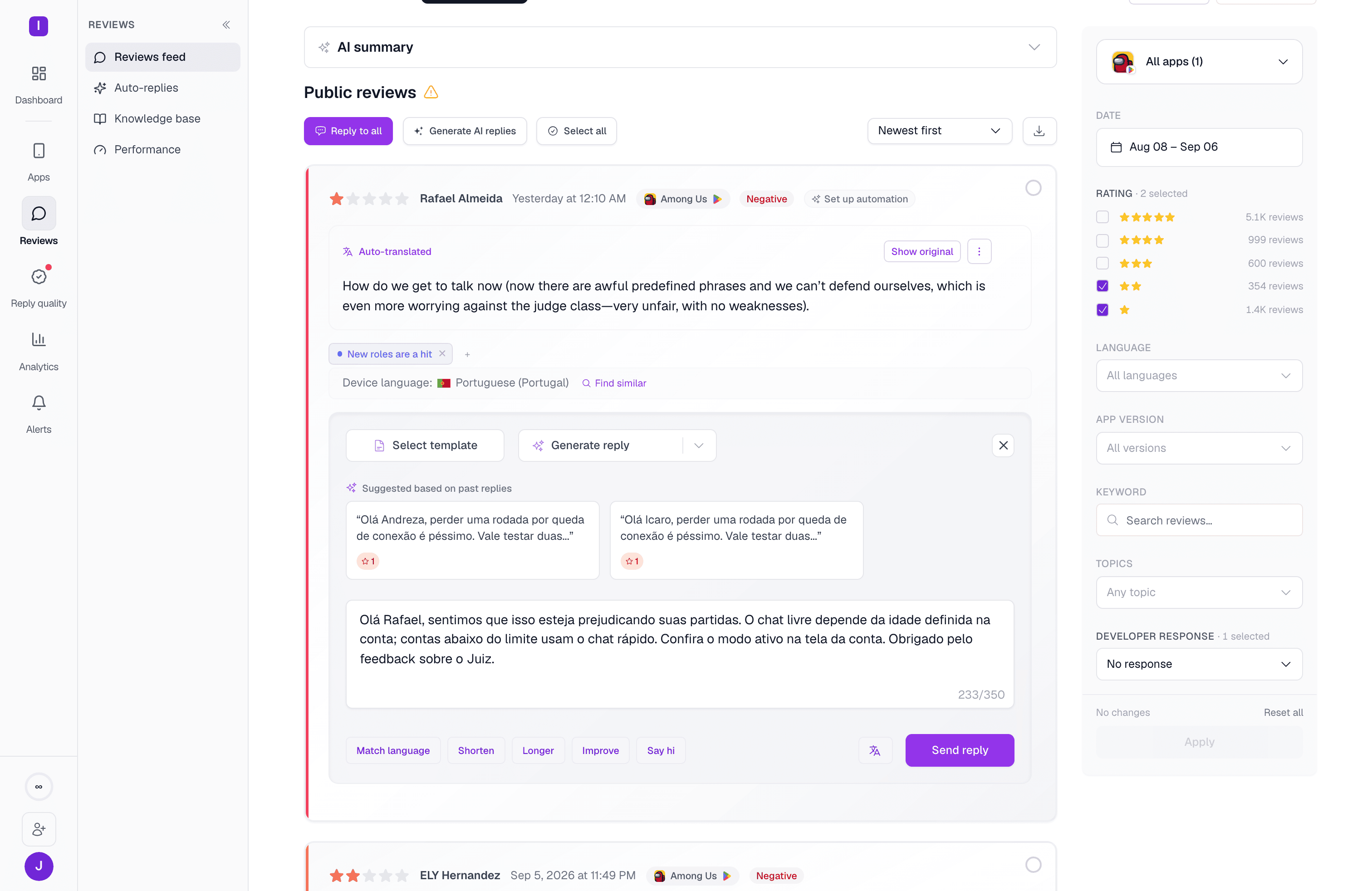
A generic AI reply apologizes. A grounded one points a user at the actual fix — because it was given the actual fix to point at. The screenshot above shows this working end to end: a Portuguese-language review about an age gate got a Portuguese-language reply that references the app's real account and age-verification flow, because that content lives in the knowledge base. Without it, MAX would still reply, but with something closer to "Thanks for the feedback, we're looking into it."
## How the four inputs combine
At generation time, for a given review, AppReply pulls:
* The **documents** scoped to that review's app (or marked "All apps"), retrieved by relevance to what the review is actually about.
* The org's or app's **AI instructions** (for manual replies) — the default instruction if one is set, or whichever you pick from the dropdown.
* The **voice profile** for that app, if AppReply MAX has learned one (Pro plan) — steering phrasing and sign-offs toward how your team actually writes.
* The **AI-disclosure phrase**, appended after the reply is drafted, if your org has one configured for the review's language.
**Canned responses** work differently: they're not blended into an AI draft. You (or an automation) select a folder or an individual response directly, and AppReply posts it — optionally rephrased or translated by AI first. See [Automations](/auto-replies/overview) for how a rule picks a folder at random per match, so reviewers hitting the same rule don't all get an identical reply.
## Reply quality grades against this, too
If your plan has [reply quality](/reply-quality/overview) turned on, two of its scorecard criteria grade replies directly against these inputs: **Actually solves the problem** checks a reply against your knowledge base, and **Follows your reply guidance** checks it against your AI instructions. Neither criterion can score anything until the corresponding input is configured for the app — they abstain rather than fail, which is the expected state on a fresh scorecard, not a bug.
Uploaded files, written articles, and crawled URL sources — and how they're chunked for retrieval
Every tab, field, and modal on the Knowledge base page
Reusable guidance the AI follows when generating manual replies
How the Voice & style profile is learned from replies you've already sent
When MAX (AppReply's AI reply assistant) drafts a response, it isn't improvising from the review text alone. It draws on four things you configure — all managed from the **Knowledge base** page (**Reviews > Knowledge base** in the sidebar), plus one page of its own:
| Input | What it does | Configured on |
| - | - | - |
| **Documents & sources** | Product facts and support answers the AI can cite instead of guessing | Knowledge base tab — see [Documents & sources](/knowledge-base/documents) |
| **Canned responses** | Pre-written replies, organized into folders, one per language | Canned responses tab |
| **AI instructions** | Reusable tone/structure/signature rules for manual replies | AI instructions tab — its own guide: [AI Instructions](/essentials/ai-instructions) |
| **Voice & style** | Your derived brand-voice profile, plus the AI-disclosure phrase appended to auto-posted replies | Voice & style tab |
The UI mechanics of all four tabs — every field, every modal — are covered in the [Knowledge base page reference](/essentials/templates). This page is the map of how they fit together; that page is the manual for each control.
## Why grounding matters
A generic AI reply apologizes. A grounded one points a user at the actual fix — because it was given the actual fix to point at. The screenshot above shows this working end to end: a Portuguese-language review about an age gate got a Portuguese-language reply that references the app's real account and age-verification flow, because that content lives in the knowledge base. Without it, MAX would still reply, but with something closer to "Thanks for the feedback, we're looking into it."
## How the four inputs combine
At generation time, for a given review, AppReply pulls:
* The **documents** scoped to that review's app (or marked "All apps"), retrieved by relevance to what the review is actually about.
* The org's or app's **AI instructions** (for manual replies) — the default instruction if one is set, or whichever you pick from the dropdown.
* The **voice profile** for that app, if AppReply MAX has learned one (Pro plan) — steering phrasing and sign-offs toward how your team actually writes.
* The **AI-disclosure phrase**, appended after the reply is drafted, if your org has one configured for the review's language.
**Canned responses** work differently: they're not blended into an AI draft. You (or an automation) select a folder or an individual response directly, and AppReply posts it — optionally rephrased or translated by AI first. See [Automations](/auto-replies/overview) for how a rule picks a folder at random per match, so reviewers hitting the same rule don't all get an identical reply.
## Reply quality grades against this, too
If your plan has [reply quality](/reply-quality/overview) turned on, two of its scorecard criteria grade replies directly against these inputs: **Actually solves the problem** checks a reply against your knowledge base, and **Follows your reply guidance** checks it against your AI instructions. Neither criterion can score anything until the corresponding input is configured for the app — they abstain rather than fail, which is the expected state on a fresh scorecard, not a bug.
Uploaded files, written articles, and crawled URL sources — and how they're chunked for retrieval
Every tab, field, and modal on the Knowledge base page
Reusable guidance the AI follows when generating manual replies
How the Voice & style profile is learned from replies you've already sent