> ## Documentation Index
> Fetch the complete documentation index at: https://docs.appreply.co/llms.txt
> Use this file to discover all available pages before exploring further.
# Reviews feed
> Reply to app reviews and set up auto-replies in one click
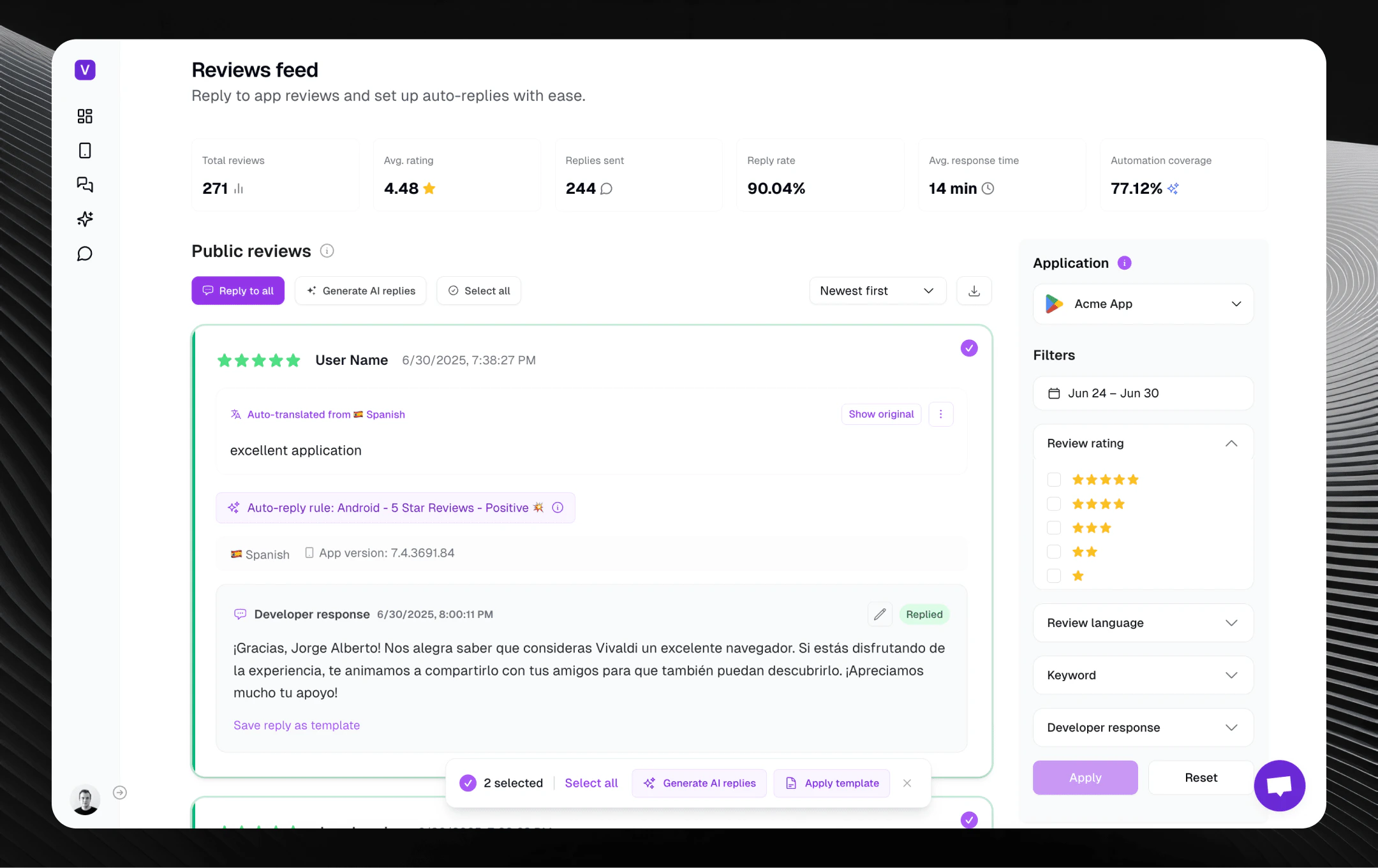 Your Reviews Feed is the heart of mobile app user engagement – a real-time stream capturing everything your users are saying about your app or game.
With powerful filtering, instant AI-generated replies, bulk actions, and intuitive tools, you'll effortlessly manage user feedback from both **Google Play** and the **Apple App Store** in one unified view.
## Manage app reviews in your language
Auto-translations are included in any paid plan. Automatically translate reviews to your preferred language with smart exception controls.
In AppReply, you can easily set your preferred target language - Russian, Spanish, English, or any of 94+ supported languages to manage your app reviews.
Add languages to never translate - for example, never translate Bulgarian or English reviews.
## Your app's pulse in real-time
Right at the top, the Reviews Feed gives you essential KPIs at a glance – total reviews, average rating, replies sent, reply rate, average response time, and automation coverage.
This instant snapshot updates based on selected filters, ensuring you're always on top of your app's performance and reputation.
## Smart filtering for targeted management
Your Reviews Feed is the heart of mobile app user engagement – a real-time stream capturing everything your users are saying about your app or game.
With powerful filtering, instant AI-generated replies, bulk actions, and intuitive tools, you'll effortlessly manage user feedback from both **Google Play** and the **Apple App Store** in one unified view.
## Manage app reviews in your language
Auto-translations are included in any paid plan. Automatically translate reviews to your preferred language with smart exception controls.
In AppReply, you can easily set your preferred target language - Russian, Spanish, English, or any of 94+ supported languages to manage your app reviews.
Add languages to never translate - for example, never translate Bulgarian or English reviews.
## Your app's pulse in real-time
Right at the top, the Reviews Feed gives you essential KPIs at a glance – total reviews, average rating, replies sent, reply rate, average response time, and automation coverage.
This instant snapshot updates based on selected filters, ensuring you're always on top of your app's performance and reputation.
## Smart filtering for targeted management
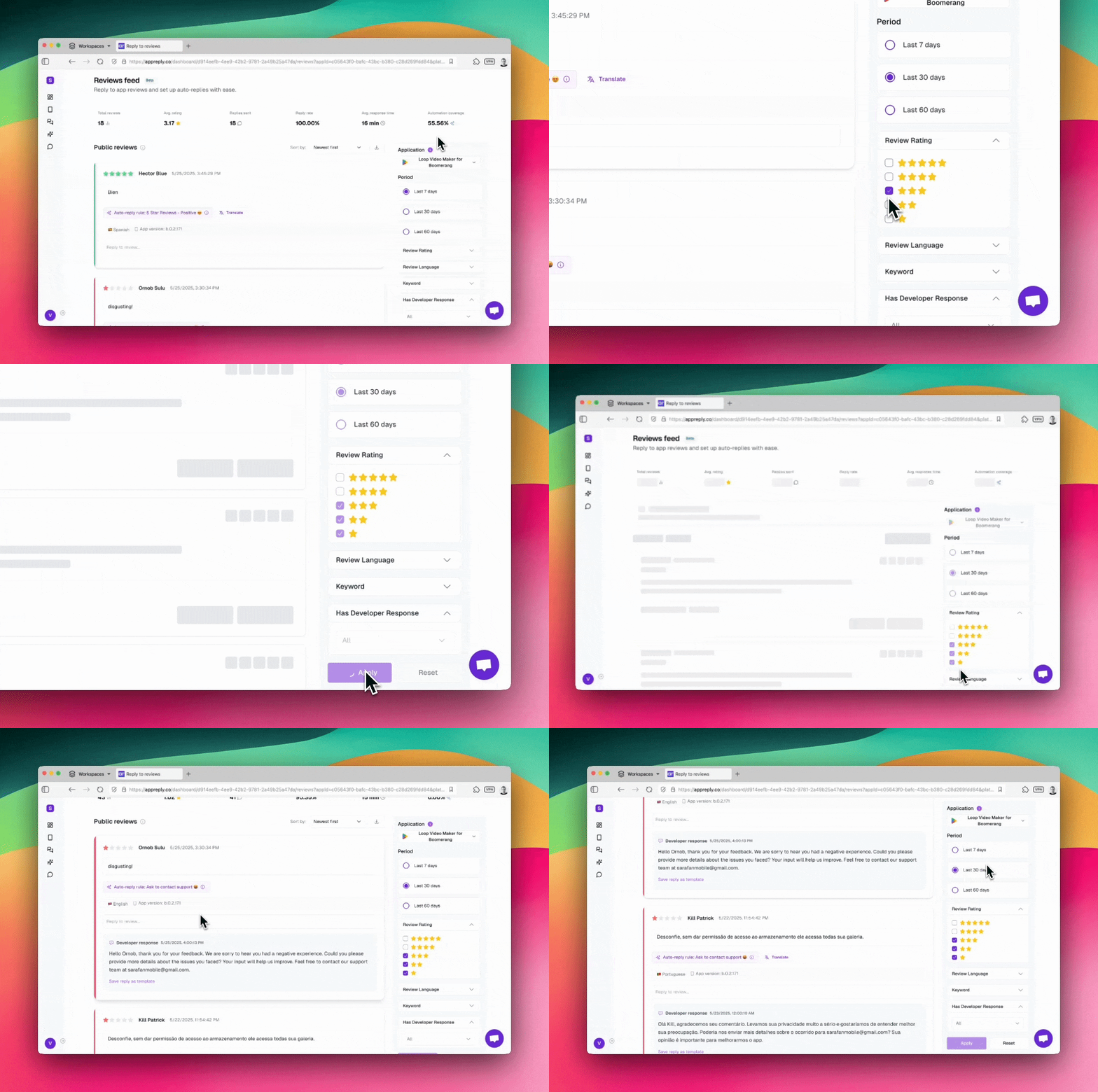 Zero in on exactly what matters most with our dynamic filtering system:
Switch between your connected apps instantly and specify review timeframes (7, 30, or 60 days) to focus on recent feedback or broader trends.
Filter by specific star ratings to tackle urgent 1-star concerns, celebrate 5-star reviews, or analyze patterns across different satisfaction levels.
Select specific review languages to manage international feedback effectively, ensuring culturally appropriate responses in the right language.
Search for specific words, phrases, or themes to identify recurring issues, feature requests, or positive mentions across all reviews.
View reviews with or without developer responses to ensure nothing slips through the cracks and maintain consistent engagement.
This precision targeting lets you quickly identify priority areas and maintain comprehensive coverage across all user feedback.
## Unified cross-platform experience
When integrated, your feed automatically consolidates reviews from both Google Play and Apple App Store, eliminating platform switching and providing a complete view of user sentiment.
**Review visibility timing**: Google Play reviews become publicly visible after 24 hours, while iOS reviews typically appear within 36-48 hours. Even without full integration, publicly available reviews are displayed automatically.
## Bulk actions for efficient management
Handle multiple reviews simultaneously with powerful bulk operation tools:
Select individual reviews or use "Select all" to choose all reviews on the current page for batch operations.
Generate AI-powered responses for multiple selected reviews at once. Each response is individually crafted based on the specific review content, rating, and context while maintaining consistency across your brand voice. **(Paid plans only)**
Apply response templates to multiple reviews simultaneously. Choose from your organized template folders and AppReply will randomly select appropriate responses to ensure variety while maintaining quality.
Submit all manual responses with content in a single action. Perfect for reviewing and sending multiple replies you've crafted or generated across the current page.
The bulk actions bar appears when reviews are selected, providing a streamlined interface for mass operations without losing individual review context.
## AI-powered response generation
Zero in on exactly what matters most with our dynamic filtering system:
Switch between your connected apps instantly and specify review timeframes (7, 30, or 60 days) to focus on recent feedback or broader trends.
Filter by specific star ratings to tackle urgent 1-star concerns, celebrate 5-star reviews, or analyze patterns across different satisfaction levels.
Select specific review languages to manage international feedback effectively, ensuring culturally appropriate responses in the right language.
Search for specific words, phrases, or themes to identify recurring issues, feature requests, or positive mentions across all reviews.
View reviews with or without developer responses to ensure nothing slips through the cracks and maintain consistent engagement.
This precision targeting lets you quickly identify priority areas and maintain comprehensive coverage across all user feedback.
## Unified cross-platform experience
When integrated, your feed automatically consolidates reviews from both Google Play and Apple App Store, eliminating platform switching and providing a complete view of user sentiment.
**Review visibility timing**: Google Play reviews become publicly visible after 24 hours, while iOS reviews typically appear within 36-48 hours. Even without full integration, publicly available reviews are displayed automatically.
## Bulk actions for efficient management
Handle multiple reviews simultaneously with powerful bulk operation tools:
Select individual reviews or use "Select all" to choose all reviews on the current page for batch operations.
Generate AI-powered responses for multiple selected reviews at once. Each response is individually crafted based on the specific review content, rating, and context while maintaining consistency across your brand voice. **(Paid plans only)**
Apply response templates to multiple reviews simultaneously. Choose from your organized template folders and AppReply will randomly select appropriate responses to ensure variety while maintaining quality.
Submit all manual responses with content in a single action. Perfect for reviewing and sending multiple replies you've crafted or generated across the current page.
The bulk actions bar appears when reviews are selected, providing a streamlined interface for mass operations without losing individual review context.
## AI-powered response generation
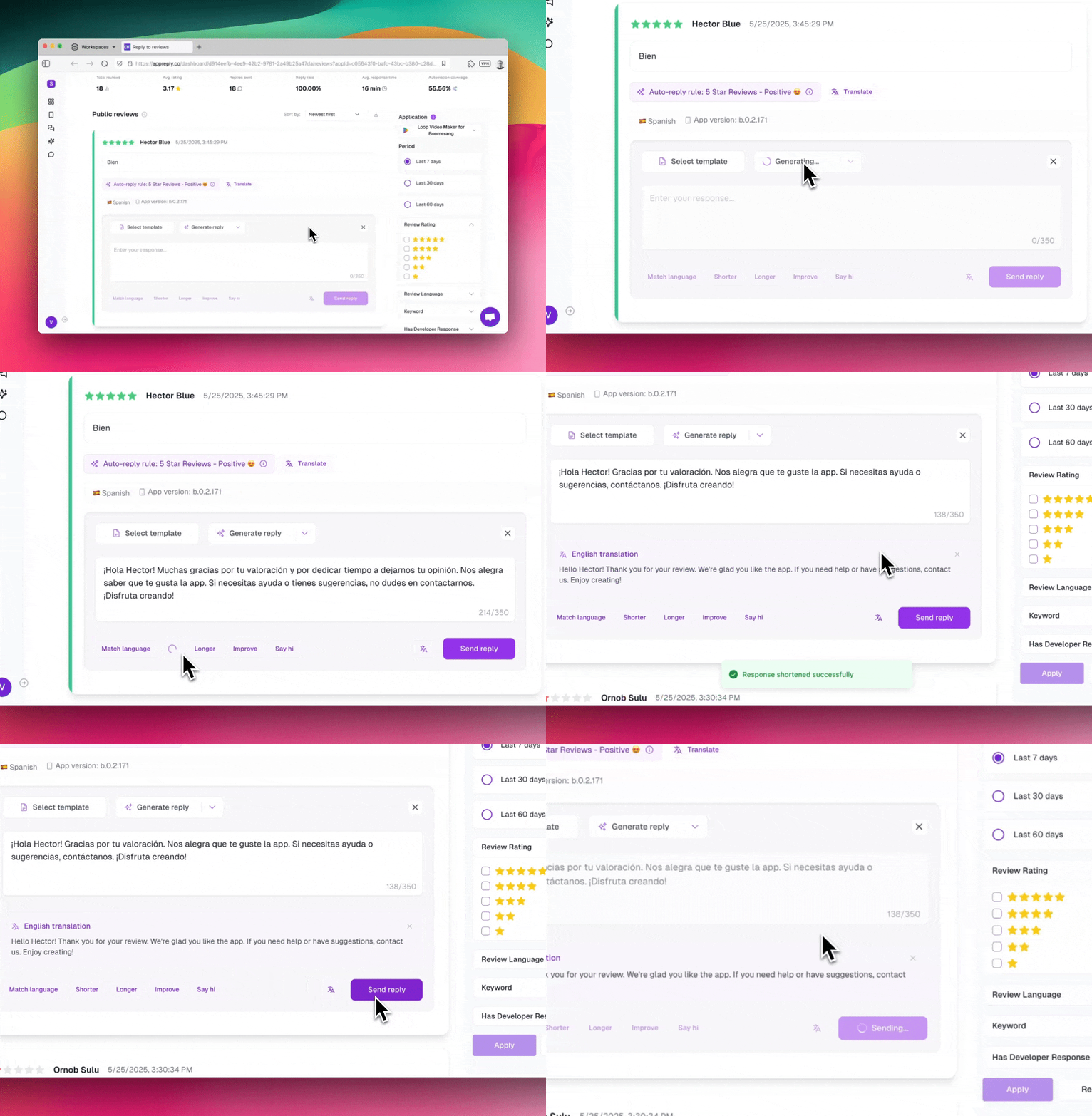 Each review card becomes your intelligent response workspace. Simply click in the reply field to access powerful AI assistance:
Choose from three AI-powered response types: balanced professional replies, support contact requests, or polite rating update requests – all tailored to your app and the specific review context.
AI responses are enhanced using successful past replies from similar reviews, ensuring consistency and learning from what works best for your app and users.
Perfect your replies with one-click adjustments: make responses shorter or longer, improve writing quality, add personal greetings, or automatically match the reviewer's language.
Automatically detect review languages and generate responses in the appropriate language, or translate existing responses to match reviewer preferences.
Access your saved response templates organized in customizable folders, or save AI-generated replies as new templates for future consistency.
**Industry benchmark**: Top-performing apps maintain a 90% reply rate with under 20-minute response times by combining intelligent auto-replies with strategic manual intervention and efficient bulk operations.
## Response enhancement toolkit
Fine-tune every reply with powerful editing options:
**Make shorter**: Condense responses for impact and brevity\
**Make longer**: Add detail and warmth for complex issues
**Match reviewer's language**: Automatically translate your response to the reviewer's detected language for natural, localized engagement
**Improve writing**: Enhance clarity, tone, and professionalism using insights from similar successful responses\
**Add greeting**: Include personalized salutations for warmer communication
**Translate to English**: Convert foreign language responses to English for review and consistency checking
## Review analysis and patterns
Unlock deeper insights with AI-powered pattern analysis:
Identify trending topics, sentiment shifts, and recurring themes across all reviews to inform product decisions and support strategies.
Receive prioritized recommendations based on review patterns, helping you address critical issues and capitalize on positive feedback.
Download filtered review data as CSV files (paid plans) for deeper analysis and reporting to stakeholders.
## Review states and automation hints
Each review displays helpful indicators:
**Queued**: Response scheduled for sending\
**Replied**: Successfully posted to app store\
**Manual/Automated**: Shows response origin for tracking
See which automation rules would apply to specific reviews, with options to edit responses or create new automation rules directly from the review.
Preview what automated responses would look like for reviews matching your existing rules, with options to send or customize before posting.
## Subscription features
AppReply offers different capabilities based on your subscription tier:
* Individual AI reply generation
* Manual response crafting
* Basic automation rules (up to 2)
* Template access and creation
* Standard filtering and search
* **Bulk AI reply generation** for multiple reviews
* **CSV export** of filtered review data
* Unlimited automation rules
* Priority support and advanced features
* Enhanced AI with past response learning
With AppReply, every user interaction becomes a meaningful touchpoint, driving better app ratings, stronger user loyalty, and actionable insights for continuous improvement. Scale your response management from individual replies to bulk operations as your app grows.
Customize response templates (canned responses) to match your brand voice
Get started with smart personalized auto-replies
Each review card becomes your intelligent response workspace. Simply click in the reply field to access powerful AI assistance:
Choose from three AI-powered response types: balanced professional replies, support contact requests, or polite rating update requests – all tailored to your app and the specific review context.
AI responses are enhanced using successful past replies from similar reviews, ensuring consistency and learning from what works best for your app and users.
Perfect your replies with one-click adjustments: make responses shorter or longer, improve writing quality, add personal greetings, or automatically match the reviewer's language.
Automatically detect review languages and generate responses in the appropriate language, or translate existing responses to match reviewer preferences.
Access your saved response templates organized in customizable folders, or save AI-generated replies as new templates for future consistency.
**Industry benchmark**: Top-performing apps maintain a 90% reply rate with under 20-minute response times by combining intelligent auto-replies with strategic manual intervention and efficient bulk operations.
## Response enhancement toolkit
Fine-tune every reply with powerful editing options:
**Make shorter**: Condense responses for impact and brevity\
**Make longer**: Add detail and warmth for complex issues
**Match reviewer's language**: Automatically translate your response to the reviewer's detected language for natural, localized engagement
**Improve writing**: Enhance clarity, tone, and professionalism using insights from similar successful responses\
**Add greeting**: Include personalized salutations for warmer communication
**Translate to English**: Convert foreign language responses to English for review and consistency checking
## Review analysis and patterns
Unlock deeper insights with AI-powered pattern analysis:
Identify trending topics, sentiment shifts, and recurring themes across all reviews to inform product decisions and support strategies.
Receive prioritized recommendations based on review patterns, helping you address critical issues and capitalize on positive feedback.
Download filtered review data as CSV files (paid plans) for deeper analysis and reporting to stakeholders.
## Review states and automation hints
Each review displays helpful indicators:
**Queued**: Response scheduled for sending\
**Replied**: Successfully posted to app store\
**Manual/Automated**: Shows response origin for tracking
See which automation rules would apply to specific reviews, with options to edit responses or create new automation rules directly from the review.
Preview what automated responses would look like for reviews matching your existing rules, with options to send or customize before posting.
## Subscription features
AppReply offers different capabilities based on your subscription tier:
* Individual AI reply generation
* Manual response crafting
* Basic automation rules (up to 2)
* Template access and creation
* Standard filtering and search
* **Bulk AI reply generation** for multiple reviews
* **CSV export** of filtered review data
* Unlimited automation rules
* Priority support and advanced features
* Enhanced AI with past response learning
With AppReply, every user interaction becomes a meaningful touchpoint, driving better app ratings, stronger user loyalty, and actionable insights for continuous improvement. Scale your response management from individual replies to bulk operations as your app grows.
Customize response templates (canned responses) to match your brand voice
Get started with smart personalized auto-replies