> ## Documentation Index
> Fetch the complete documentation index at: https://docs.appreply.co/llms.txt
> Use this file to discover all available pages before exploring further.
# Automation actions
> Master template-based and AI-generated responses to create perfect replies every time
Actions determine **how** your automation responds once a review matches your trigger conditions. Choose from template-based responses with AI enhancements or fully AI-generated replies crafted from scratch.
**Response quality tip:** The secret to great automated responses is matching the response method to the review type. Use templates for consistent scenarios and AI generation for complex, varied feedback.
## Template-based responses
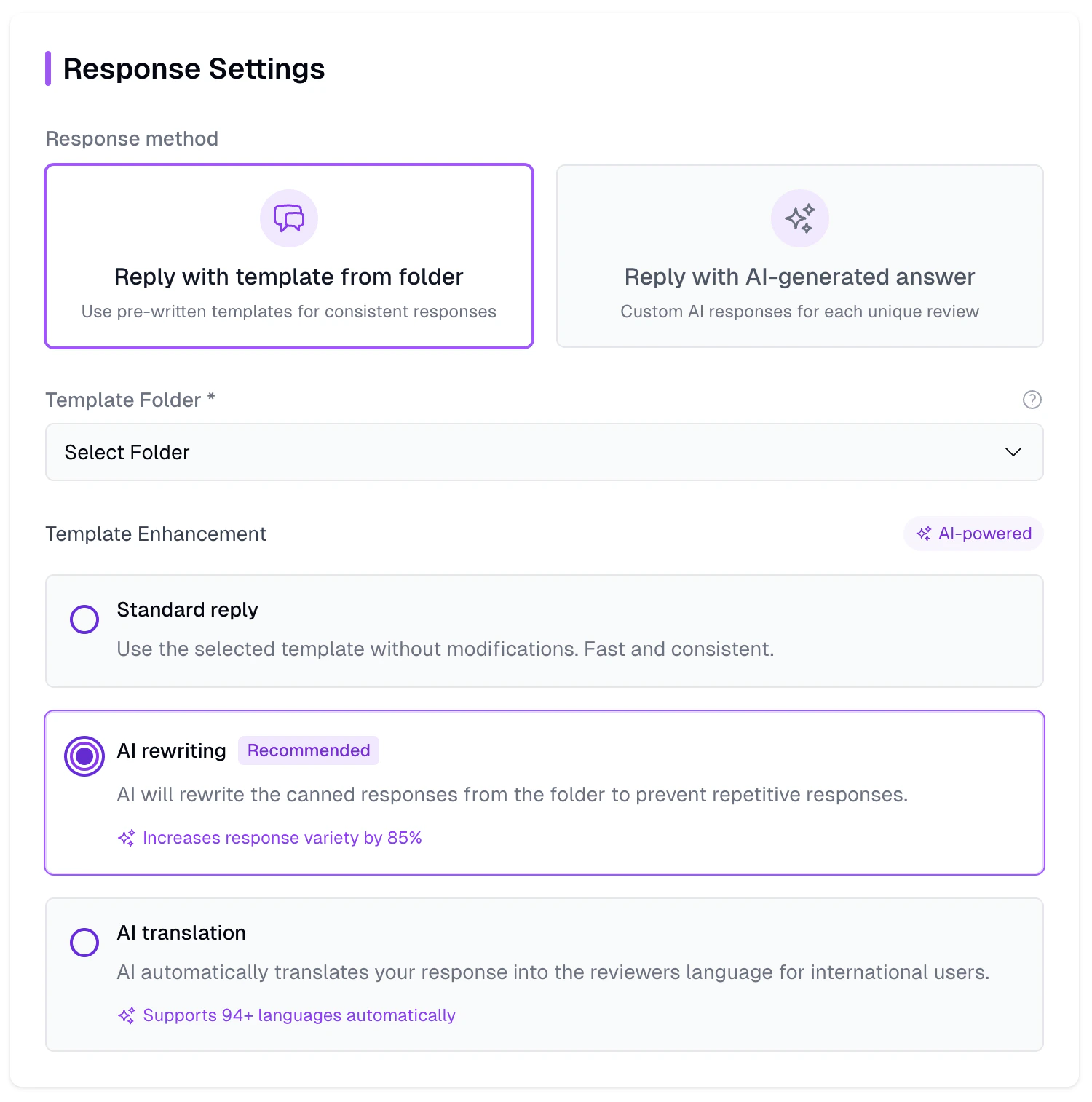 Template-based actions use your pre-written response templates as the foundation, with optional AI enhancements to add variety and personalization.
### Choose your template folder
Select from your organized template folders to match the automation's purpose:
**Use for:** 4-5 star thank you messages
* Store 5-25 variations of gratitude messages
* Include feature announcements or updates
* Add subtle requests for referrals or social shares
**Use for:** Bug reports and technical issues
* Acknowledge the problem empathetically
* Provide troubleshooting steps or workarounds
* Include contact information for escalation
**Use for:** User suggestions and enhancement requests
* Thank users for their input
* Explain your development process
* Set realistic expectations for timelines
**Use for:** Subscription and payment questions
* Clarify pricing and billing cycles
* Provide clear paths to account management
* Address common subscription concerns
**Template organization strategy:** Create template folders that mirror your automation categories. This makes selecting the right responses intuitive and keeps your workflow organized.
## AI enhancement options
Transform your static templates into dynamic, personalized responses:
### Standard reply (no enhancement)
Use your template exactly as written – perfect for consistent, formal responses:
**Best for scenarios requiring exact consistency:**
* Legal disclaimers or compliance statements
* Specific step-by-step instructions
* Formal business communications
* URLs and contact information that can't change
**Example use case:** Privacy policy responses, refund procedures, technical support steps
* Keep templates concise and scannable
* Use clear, professional language
* Include specific action items when relevant
* Test readability across different devices
### AI rewriting (recommended)
Template-based actions use your pre-written response templates as the foundation, with optional AI enhancements to add variety and personalization.
### Choose your template folder
Select from your organized template folders to match the automation's purpose:
**Use for:** 4-5 star thank you messages
* Store 5-25 variations of gratitude messages
* Include feature announcements or updates
* Add subtle requests for referrals or social shares
**Use for:** Bug reports and technical issues
* Acknowledge the problem empathetically
* Provide troubleshooting steps or workarounds
* Include contact information for escalation
**Use for:** User suggestions and enhancement requests
* Thank users for their input
* Explain your development process
* Set realistic expectations for timelines
**Use for:** Subscription and payment questions
* Clarify pricing and billing cycles
* Provide clear paths to account management
* Address common subscription concerns
**Template organization strategy:** Create template folders that mirror your automation categories. This makes selecting the right responses intuitive and keeps your workflow organized.
## AI enhancement options
Transform your static templates into dynamic, personalized responses:
### Standard reply (no enhancement)
Use your template exactly as written – perfect for consistent, formal responses:
**Best for scenarios requiring exact consistency:**
* Legal disclaimers or compliance statements
* Specific step-by-step instructions
* Formal business communications
* URLs and contact information that can't change
**Example use case:** Privacy policy responses, refund procedures, technical support steps
* Keep templates concise and scannable
* Use clear, professional language
* Include specific action items when relevant
* Test readability across different devices
### AI rewriting (recommended)
 Let AI rephrase your templates for each response while preserving the core message:
**Your template:**
```
Thank you for your 5-star review! We're thrilled you're enjoying the app.
Your feedback motivates our team to keep improving.
```
**AI variations:**
* "Thanks so much for the fantastic review! It's amazing to hear you love the app. Feedback like yours inspires us to keep pushing forward."
* "We really appreciate your 5-star rating! Knowing you're having a great experience with the app makes our day. Your support means everything to our team."
* "What a wonderful review – thank you! We're so happy you're enjoying the app. Your positive feedback gives our team the energy to keep innovating."
**Key advantages:**
* **85% variety increase** while maintaining your message
* Natural, conversational language that feels personal
* Reduces robotic/automated appearance
* Maintains your brand voice and key points
* Perfect for high-volume responses
**Ideal for:** Thank you messages, apologies, general acknowledgments
**Optimize your templates for AI rewriting:**
* Write in natural, conversational tone
* Include specific key points you want preserved
* Avoid overly complex sentence structures
* Test with a few variations to ensure quality
* Keep brand-specific terms in quotes to preserve them
### AI translation
Let AI rephrase your templates for each response while preserving the core message:
**Your template:**
```
Thank you for your 5-star review! We're thrilled you're enjoying the app.
Your feedback motivates our team to keep improving.
```
**AI variations:**
* "Thanks so much for the fantastic review! It's amazing to hear you love the app. Feedback like yours inspires us to keep pushing forward."
* "We really appreciate your 5-star rating! Knowing you're having a great experience with the app makes our day. Your support means everything to our team."
* "What a wonderful review – thank you! We're so happy you're enjoying the app. Your positive feedback gives our team the energy to keep innovating."
**Key advantages:**
* **85% variety increase** while maintaining your message
* Natural, conversational language that feels personal
* Reduces robotic/automated appearance
* Maintains your brand voice and key points
* Perfect for high-volume responses
**Ideal for:** Thank you messages, apologies, general acknowledgments
**Optimize your templates for AI rewriting:**
* Write in natural, conversational tone
* Include specific key points you want preserved
* Avoid overly complex sentence structures
* Test with a few variations to ensure quality
* Keep brand-specific terms in quotes to preserve them
### AI translation
 Automatically translate your templates to match each reviewer's language:
**Automatic language detection:**
1. AppReply detects the review's language
2. Translates your template to match
3. Preserves tone, intent, and key information
4. Posts in the reviewer's native language
**Supported languages:** 97 languages including:
* **European:** Spanish, French, German, Italian, Portuguese
* **Asian:** Chinese, Japanese, Korean, Hindi, Arabic
* **Emerging:** Vietnamese, Thai, Indonesian, Turkish
**What makes our translation special:**
* Context-aware translations that understand app review nuances
* Preserves emotional tone and professional level
* Maintains technical accuracy for app-specific terms
* Cultural adaptation beyond literal translation
**Quality metrics:** 95%+ accuracy for major languages, 90%+ for emerging markets
**Maximize international impact:**
* Write templates in clear, simple English for best translation results
* Avoid idioms, slang, or culture-specific references
* Keep sentences concise and direct
* Test translations with native speakers when possible
* Consider cultural context for different markets
## AI-generated responses
Automatically translate your templates to match each reviewer's language:
**Automatic language detection:**
1. AppReply detects the review's language
2. Translates your template to match
3. Preserves tone, intent, and key information
4. Posts in the reviewer's native language
**Supported languages:** 97 languages including:
* **European:** Spanish, French, German, Italian, Portuguese
* **Asian:** Chinese, Japanese, Korean, Hindi, Arabic
* **Emerging:** Vietnamese, Thai, Indonesian, Turkish
**What makes our translation special:**
* Context-aware translations that understand app review nuances
* Preserves emotional tone and professional level
* Maintains technical accuracy for app-specific terms
* Cultural adaptation beyond literal translation
**Quality metrics:** 95%+ accuracy for major languages, 90%+ for emerging markets
**Maximize international impact:**
* Write templates in clear, simple English for best translation results
* Avoid idioms, slang, or culture-specific references
* Keep sentences concise and direct
* Test translations with native speakers when possible
* Consider cultural context for different markets
## AI-generated responses
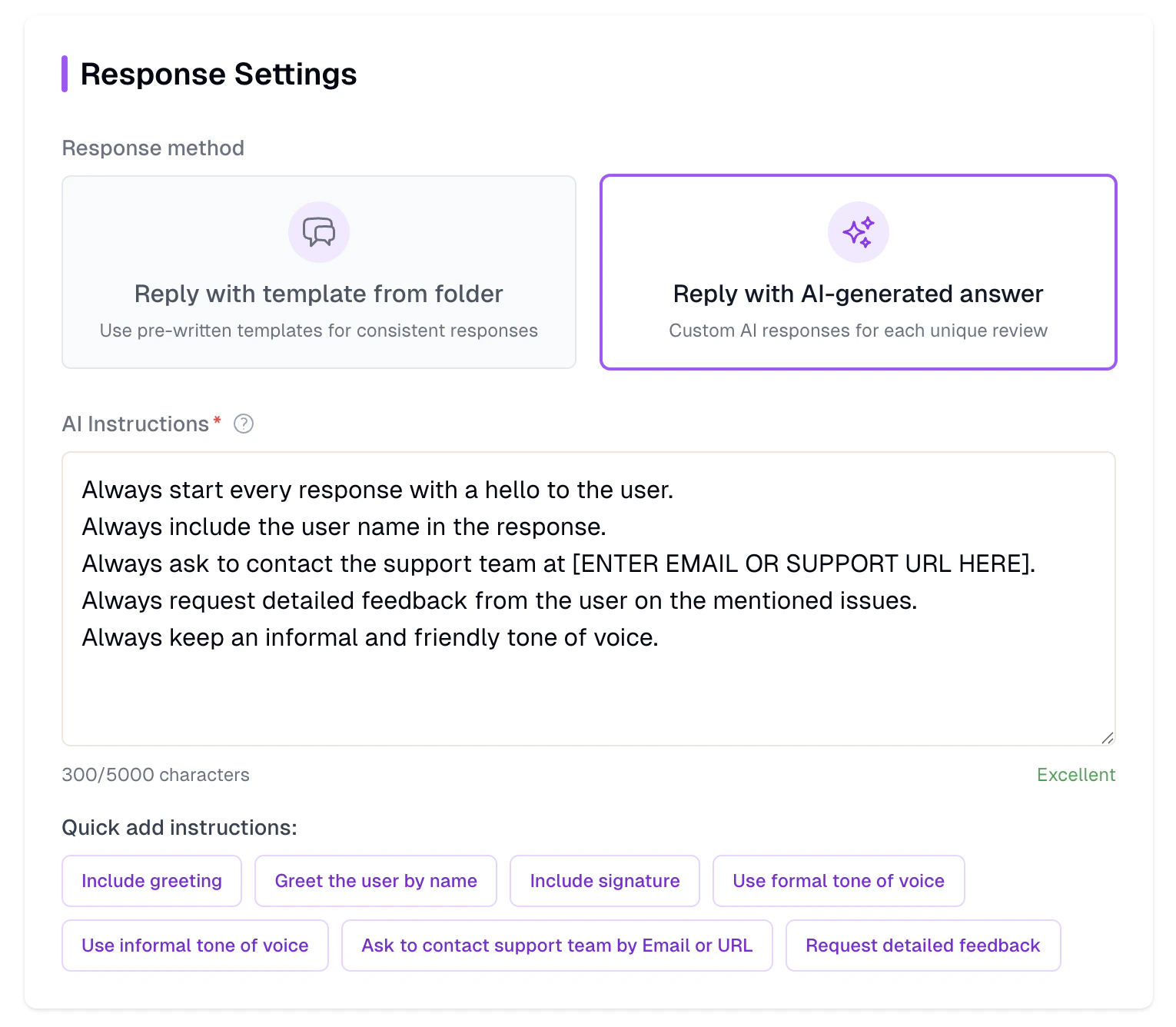 Let AI craft completely custom replies from scratch, tailored to each review's unique content and context:
### Writing effective AI instructions
The quality of AI-generated responses depends heavily on your instructions. Think of them as briefing a new team member:
**Follow this framework for best results:**
```
TONE & STYLE:
Be empathetic and professional. Use a friendly but not overly casual tone.
CONTENT REQUIREMENTS:
- Thank the user for their feedback
- Address their specific concern mentioned in the review
- If it's a bug report, acknowledge the issue and mention our team is investigating
- Always end with an invitation to contact support for immediate help
AVOID:
- Generic responses that could apply to any app
- Overly promotional language
- Making promises about specific fix timelines
```
**For complex scenarios, provide detailed guidance:**
```
CONTEXT: You're responding as a customer success manager for a productivity app.
PERSONALIZATION: Reference specific features or issues mentioned in the review.
ESCALATION: For technical issues, guide users to our in-app help section first, then to email support if needed.
TONE VARIATIONS:
- 5-star reviews: Enthusiastic gratitude, ask for feature suggestions
- 3-star reviews: Understanding tone, focus on addressing concerns
- 1-2 star reviews: Empathetic apology, immediate help offering
BRAND VOICE: Professional but approachable, like a knowledgeable friend helping out.
```
**Rating-specific instruction examples:**
**For positive reviews (4-5 stars):**
```
Be genuinely grateful and enthusiastic. Thank them for their support,
ask if they have feature suggestions, and mention they can reach out
anytime. Keep it warm but professional.
```
**For negative reviews (1-2 stars):**
```
Be empathetic and apologetic without being defensive. Acknowledge their
frustration, take responsibility, and provide clear next steps for
resolution. Always offer direct contact with our support team.
```
### AI response examples
**Review:** "Love this app! The new dark mode is perfect and the sync feature works flawlessly."
**AI Response:** "Thank you so much for the amazing review! We're absolutely thrilled that you're loving the new dark mode. If you ever have suggestions for other features you'd like to see, we'd love to hear from you at [feedback@ourapp.com](mailto:feedback@ourapp.com). Thanks again!"
**Review:** "App keeps crashing when I try to export files. Really frustrating as I need this for work."
**AI Response:** "We sincerely apologize for the crashes you're experiencing with file exports. Please reach out to our support team at [support@ourapp.com](mailto:support@ourapp.com) with details about your device and the file types you're exporting. Thank you for your patience, and we'll get this resolved for you quickly."
**Review:** "Good app but really needs a calendar integration. Would make it perfect for my workflow."
**AI Response:** "Thank you for the positive feedback and the great suggestion! Calendar integration is actually something we've been exploring. In the meantime, you might find our existing scheduling features helpful – check out the 'Planning' section in the app. And please keep the suggestions coming at [feedback@ourapp.com](mailto:feedback@ourapp.com)!"
## Approval workflow
When "Require approval" is enabled on an automation, generated responses are not posted immediately. Instead, they are saved with a "pending approval" status.
The automation generates a response as usual, using your chosen method (template or AI-generated).
The response appears in your review feed with an approval badge instead of being posted to the store.
A team member reads the generated response and can edit it if needed.
Click approve to post the response to the app store. Or reject it to discard.
Approval mode works with both template-based and AI-generated responses. It is especially useful when you are testing a new automation or handling sensitive topics where you want a human in the loop.
## Knowledge base and embeddings
Available with AppReply MAX on the Pro plan.
When using AI-generated responses, you can enable the "Use knowledge base" toggle. This pulls relevant information from your uploaded documents (FAQs, product guides, support articles) to make responses more accurate and specific to your product.
The AI also draws on your past successful responses to improve quality over time. As you approve and post more responses, the system builds an embedding index of what works well, helping future generated replies match your established tone and level of detail.
## Choosing the right response method
Match your response method to the scenario for optimal results:
**Perfect for:**
* High-volume, similar responses (thank you messages)
* Scenarios where you want consistency with variety
* Responses with specific required information
* When you have proven templates that work well
**Success rate:** 95% user satisfaction when templates are well-written
**Perfect for:**
* International user bases
* Simple, clear messages that translate well
* When you want to maintain exact messaging across languages
* Compliance or legal content that must be precise
**Best practice:** Combine with AI Rewriting for translated variety
**Perfect for:**
* Complex, varied feedback requiring unique responses
* When you want maximum personalization
* Reviews with specific technical issues or detailed feedback
* Scenarios where templates feel too generic
**Consideration:** Requires more detailed instructions but offers maximum flexibility
## Response quality & testing
### Quality assurance checklist
**Test your automation thoroughly:**
* Create automation in disabled mode first
* Review potential matches in your Reviews Feed
* Test with various review types and languages
* Verify responses sound natural and on-brand
* Check that all links and contact information work
**Ongoing optimization:**
* Review automated responses weekly for quality
* Look for user replies to your automated responses
* Track response engagement and follow-up questions
* Adjust instructions based on real performance
* Update templates based on seasonal or product changes
**Watch for these issues:**
* Users replying "this seems automated"
* Generic responses that don't address specific concerns
* Grammatical errors or awkward phrasing in translations
* Responses that contradict your current app features
* Overly long or short responses for the review type
### Advanced strategies
The most successful automation strategies combine multiple response methods strategically rather than relying on a single approach.
For complex, detailed reviews that mention specific features or technical issues, AI-generated responses provide the flexibility to address each unique situation with personalized replies.
Meanwhile, common scenarios like thank-you messages or standard feature requests work perfectly with template-based responses enhanced by AI rewriting to maintain variety. International users benefit most from template-based responses combined with AI translation, ensuring your core messaging remains consistent while being culturally and linguistically appropriate.
Consider adjusting your response method based on review sentiment and length as well. Short, positive reviews (under 50 characters) work well with brief template responses, while longer, detailed feedback deserves the personalized attention that AI-generated responses provide. This tiered approach ensures you're matching the effort level to the user's investment in providing feedback.
### A/B testing for optimization
Systematic testing is crucial for optimizing your automation performance over time.
Create two similar automations targeting the same review types but using different response methods – for example, one using template-based responses with AI rewriting and another using fully AI-generated responses.
Run both for several weeks while tracking key metrics like user engagement, follow-up questions, and response sentiment analysis.
Pay particular attention to user replies to your automated responses. If users frequently ask follow-up questions or seem confused, your response method may need adjustment. Conversely, positive user reactions, thank-you replies, or rating improvements indicate successful automation strategies.
Test different AI instruction styles within your generated responses as well – some users prefer more formal, professional tones while others respond better to casual, friendly approaches.
### Multi-language market strategy
For global apps, develop a sophisticated language-based automation hierarchy.
Start with detailed, culturally-aware automations for your primary markets using native-language templates, then create broader international automations using English templates with AI translation for secondary markets. This ensures your most important user bases receive optimized responses while still providing quality support to all users.
Consider cultural context beyond just language translation. German users often expect more detailed, structured responses about data privacy and GDPR compliance, while Japanese users typically prefer more formal, respectful language structures.
Create market-specific automation rules that not only translate but also adapt tone and content to cultural expectations, significantly improving user satisfaction in international markets.
## Troubleshooting common issues
**Solutions:**
* Add more specific instructions for AI responses
* Include context about your app and user base
* Use AI rewriting instead of standard templates
* Reference specific review content in instructions
**Solutions:**
* Simplify original template language
* Avoid idioms and cultural references
* Test translations with native speakers
* Consider market-specific template variations
**Solutions:**
* Adjust AI instructions for desired length
* Provide examples of ideal response length
* Match response length to review detail level
* Test different instruction frameworks
***
Master these response methods, and your automations will create replies that feel personal, helpful, and authentically from your team – even when responding to hundreds of reviews automatically.
Learn to create response templates that power your automations
Master the conditions that target exactly the right reviews
Let AI craft completely custom replies from scratch, tailored to each review's unique content and context:
### Writing effective AI instructions
The quality of AI-generated responses depends heavily on your instructions. Think of them as briefing a new team member:
**Follow this framework for best results:**
```
TONE & STYLE:
Be empathetic and professional. Use a friendly but not overly casual tone.
CONTENT REQUIREMENTS:
- Thank the user for their feedback
- Address their specific concern mentioned in the review
- If it's a bug report, acknowledge the issue and mention our team is investigating
- Always end with an invitation to contact support for immediate help
AVOID:
- Generic responses that could apply to any app
- Overly promotional language
- Making promises about specific fix timelines
```
**For complex scenarios, provide detailed guidance:**
```
CONTEXT: You're responding as a customer success manager for a productivity app.
PERSONALIZATION: Reference specific features or issues mentioned in the review.
ESCALATION: For technical issues, guide users to our in-app help section first, then to email support if needed.
TONE VARIATIONS:
- 5-star reviews: Enthusiastic gratitude, ask for feature suggestions
- 3-star reviews: Understanding tone, focus on addressing concerns
- 1-2 star reviews: Empathetic apology, immediate help offering
BRAND VOICE: Professional but approachable, like a knowledgeable friend helping out.
```
**Rating-specific instruction examples:**
**For positive reviews (4-5 stars):**
```
Be genuinely grateful and enthusiastic. Thank them for their support,
ask if they have feature suggestions, and mention they can reach out
anytime. Keep it warm but professional.
```
**For negative reviews (1-2 stars):**
```
Be empathetic and apologetic without being defensive. Acknowledge their
frustration, take responsibility, and provide clear next steps for
resolution. Always offer direct contact with our support team.
```
### AI response examples
**Review:** "Love this app! The new dark mode is perfect and the sync feature works flawlessly."
**AI Response:** "Thank you so much for the amazing review! We're absolutely thrilled that you're loving the new dark mode. If you ever have suggestions for other features you'd like to see, we'd love to hear from you at [feedback@ourapp.com](mailto:feedback@ourapp.com). Thanks again!"
**Review:** "App keeps crashing when I try to export files. Really frustrating as I need this for work."
**AI Response:** "We sincerely apologize for the crashes you're experiencing with file exports. Please reach out to our support team at [support@ourapp.com](mailto:support@ourapp.com) with details about your device and the file types you're exporting. Thank you for your patience, and we'll get this resolved for you quickly."
**Review:** "Good app but really needs a calendar integration. Would make it perfect for my workflow."
**AI Response:** "Thank you for the positive feedback and the great suggestion! Calendar integration is actually something we've been exploring. In the meantime, you might find our existing scheduling features helpful – check out the 'Planning' section in the app. And please keep the suggestions coming at [feedback@ourapp.com](mailto:feedback@ourapp.com)!"
## Approval workflow
When "Require approval" is enabled on an automation, generated responses are not posted immediately. Instead, they are saved with a "pending approval" status.
The automation generates a response as usual, using your chosen method (template or AI-generated).
The response appears in your review feed with an approval badge instead of being posted to the store.
A team member reads the generated response and can edit it if needed.
Click approve to post the response to the app store. Or reject it to discard.
Approval mode works with both template-based and AI-generated responses. It is especially useful when you are testing a new automation or handling sensitive topics where you want a human in the loop.
## Knowledge base and embeddings
Available with AppReply MAX on the Pro plan.
When using AI-generated responses, you can enable the "Use knowledge base" toggle. This pulls relevant information from your uploaded documents (FAQs, product guides, support articles) to make responses more accurate and specific to your product.
The AI also draws on your past successful responses to improve quality over time. As you approve and post more responses, the system builds an embedding index of what works well, helping future generated replies match your established tone and level of detail.
## Choosing the right response method
Match your response method to the scenario for optimal results:
**Perfect for:**
* High-volume, similar responses (thank you messages)
* Scenarios where you want consistency with variety
* Responses with specific required information
* When you have proven templates that work well
**Success rate:** 95% user satisfaction when templates are well-written
**Perfect for:**
* International user bases
* Simple, clear messages that translate well
* When you want to maintain exact messaging across languages
* Compliance or legal content that must be precise
**Best practice:** Combine with AI Rewriting for translated variety
**Perfect for:**
* Complex, varied feedback requiring unique responses
* When you want maximum personalization
* Reviews with specific technical issues or detailed feedback
* Scenarios where templates feel too generic
**Consideration:** Requires more detailed instructions but offers maximum flexibility
## Response quality & testing
### Quality assurance checklist
**Test your automation thoroughly:**
* Create automation in disabled mode first
* Review potential matches in your Reviews Feed
* Test with various review types and languages
* Verify responses sound natural and on-brand
* Check that all links and contact information work
**Ongoing optimization:**
* Review automated responses weekly for quality
* Look for user replies to your automated responses
* Track response engagement and follow-up questions
* Adjust instructions based on real performance
* Update templates based on seasonal or product changes
**Watch for these issues:**
* Users replying "this seems automated"
* Generic responses that don't address specific concerns
* Grammatical errors or awkward phrasing in translations
* Responses that contradict your current app features
* Overly long or short responses for the review type
### Advanced strategies
The most successful automation strategies combine multiple response methods strategically rather than relying on a single approach.
For complex, detailed reviews that mention specific features or technical issues, AI-generated responses provide the flexibility to address each unique situation with personalized replies.
Meanwhile, common scenarios like thank-you messages or standard feature requests work perfectly with template-based responses enhanced by AI rewriting to maintain variety. International users benefit most from template-based responses combined with AI translation, ensuring your core messaging remains consistent while being culturally and linguistically appropriate.
Consider adjusting your response method based on review sentiment and length as well. Short, positive reviews (under 50 characters) work well with brief template responses, while longer, detailed feedback deserves the personalized attention that AI-generated responses provide. This tiered approach ensures you're matching the effort level to the user's investment in providing feedback.
### A/B testing for optimization
Systematic testing is crucial for optimizing your automation performance over time.
Create two similar automations targeting the same review types but using different response methods – for example, one using template-based responses with AI rewriting and another using fully AI-generated responses.
Run both for several weeks while tracking key metrics like user engagement, follow-up questions, and response sentiment analysis.
Pay particular attention to user replies to your automated responses. If users frequently ask follow-up questions or seem confused, your response method may need adjustment. Conversely, positive user reactions, thank-you replies, or rating improvements indicate successful automation strategies.
Test different AI instruction styles within your generated responses as well – some users prefer more formal, professional tones while others respond better to casual, friendly approaches.
### Multi-language market strategy
For global apps, develop a sophisticated language-based automation hierarchy.
Start with detailed, culturally-aware automations for your primary markets using native-language templates, then create broader international automations using English templates with AI translation for secondary markets. This ensures your most important user bases receive optimized responses while still providing quality support to all users.
Consider cultural context beyond just language translation. German users often expect more detailed, structured responses about data privacy and GDPR compliance, while Japanese users typically prefer more formal, respectful language structures.
Create market-specific automation rules that not only translate but also adapt tone and content to cultural expectations, significantly improving user satisfaction in international markets.
## Troubleshooting common issues
**Solutions:**
* Add more specific instructions for AI responses
* Include context about your app and user base
* Use AI rewriting instead of standard templates
* Reference specific review content in instructions
**Solutions:**
* Simplify original template language
* Avoid idioms and cultural references
* Test translations with native speakers
* Consider market-specific template variations
**Solutions:**
* Adjust AI instructions for desired length
* Provide examples of ideal response length
* Match response length to review detail level
* Test different instruction frameworks
***
Master these response methods, and your automations will create replies that feel personal, helpful, and authentically from your team – even when responding to hundreds of reviews automatically.
Learn to create response templates that power your automations
Master the conditions that target exactly the right reviews